100% Local Processing
Protect Client Privacy. Automatically.
Qvault detects and redacts sensitive information from legal documents — names, SSNs, addresses, financial data — on desktop and mobile. Your data never leaves your device.
Qvault detects and redacts sensitive information from legal documents — names, SSNs, addresses, financial data — on desktop and mobile. Your data never leaves your device.
Available for macOS, Windows, Linux, iOS, and Android
v0.2.0 · MIT License · Free & Open Source
Purpose-built for legal professionals who handle confidential client information every day.
Regex patterns, heuristic analysis, and a local AI model work together to catch structured and contextual PII — even hidden in natural language.
Zero data transmission. Everything runs on your machine. Your clients' data never touches the cloud.
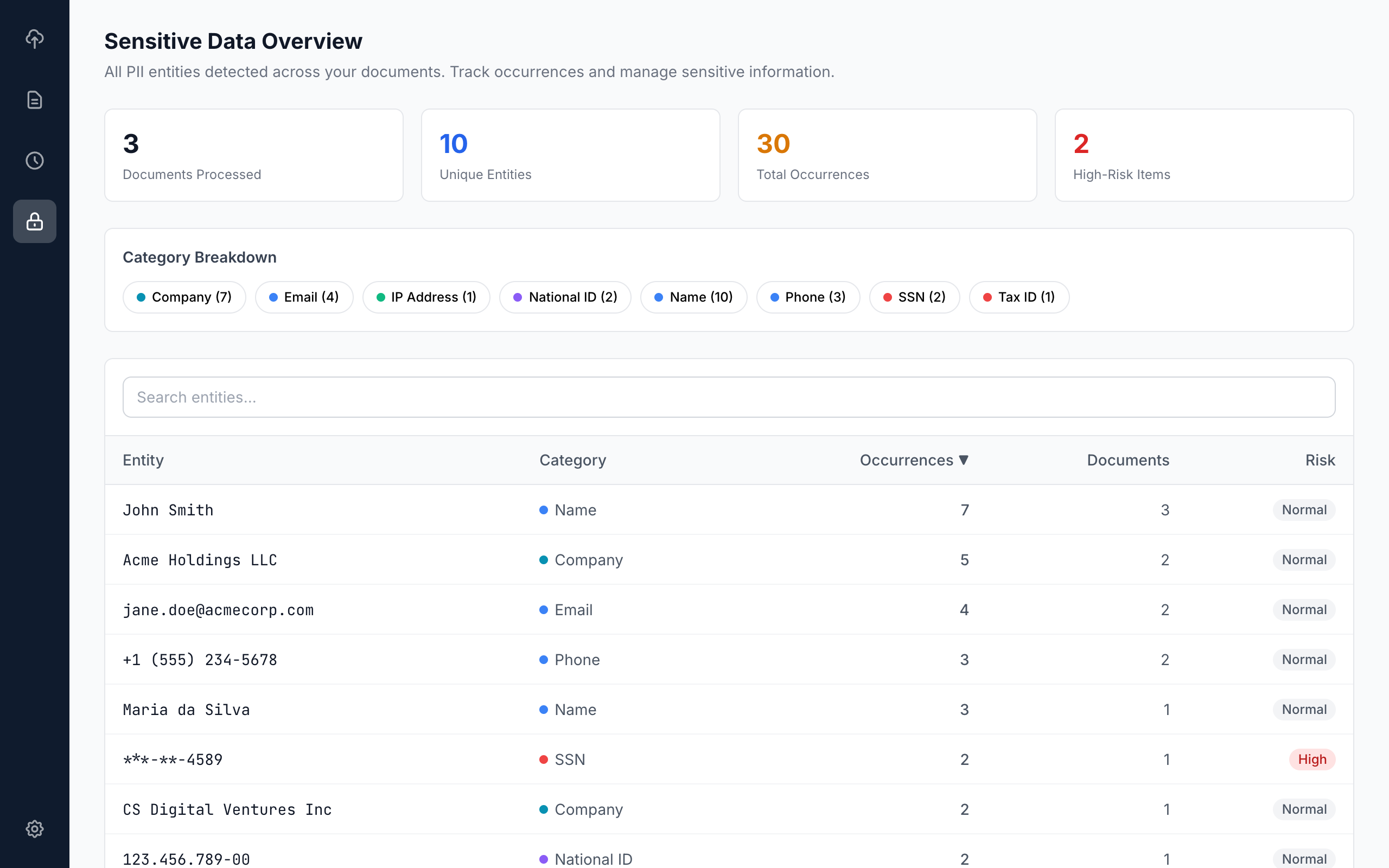
Entity database tracks all sensitive data across documents. Know exactly what PII exists in your practice.
Works with the most common legal document formats right out of the box.
One click to produce redacted documents with black-box redactions ready for filing or sharing.
Every action logged for compliance. Know who reviewed what and when.
Works on iPhone, iPad, and Android. Review and redact documents on the go with a touch-optimized interface.
Each layer catches what the previous one misses. All processing happens locally on your device — including the AI model.
High-precision pattern matching for structured data: emails, phone numbers, SSNs, credit cards, IBANs, CNPJs, CEPs, dates, and monetary amounts.
Context-aware detection of person names, company names (LLC, LTDA, EIRELI, GmbH), and addresses using capitalization patterns and legal role keywords.
A small language model (Qwen 2.5 0.5B) runs entirely on your device to catch contextual PII that patterns miss — like names and addresses hidden in natural language.
The AI model is optional and downloaded on first use. Qvault works perfectly with just Layers 1 & 2 — Layer 3 adds deeper contextual understanding for documents with complex natural language.
From upload to redacted export in minutes, not hours.
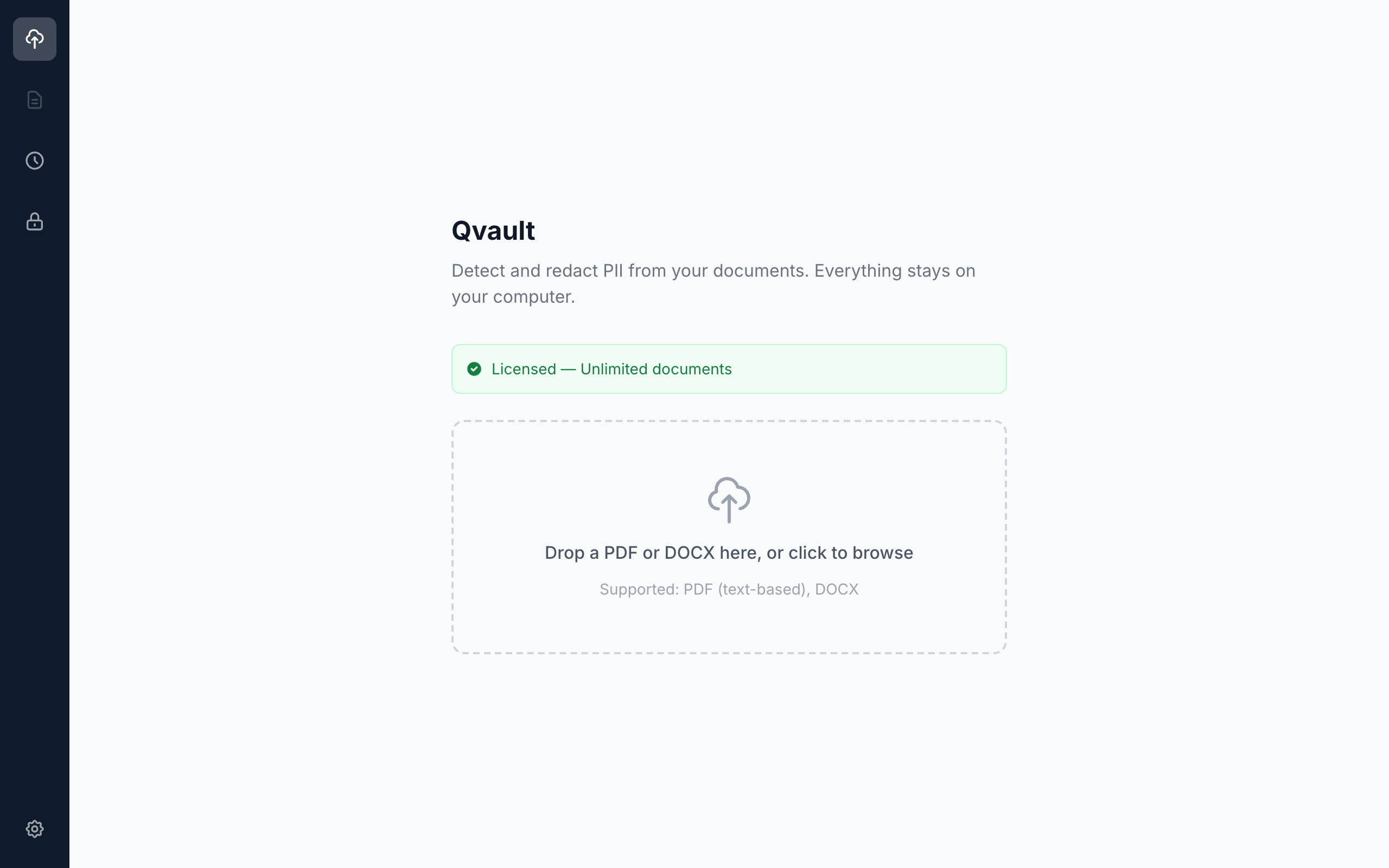
Drag and drop your PDF or DOCX. Qvault instantly begins scanning for sensitive information.
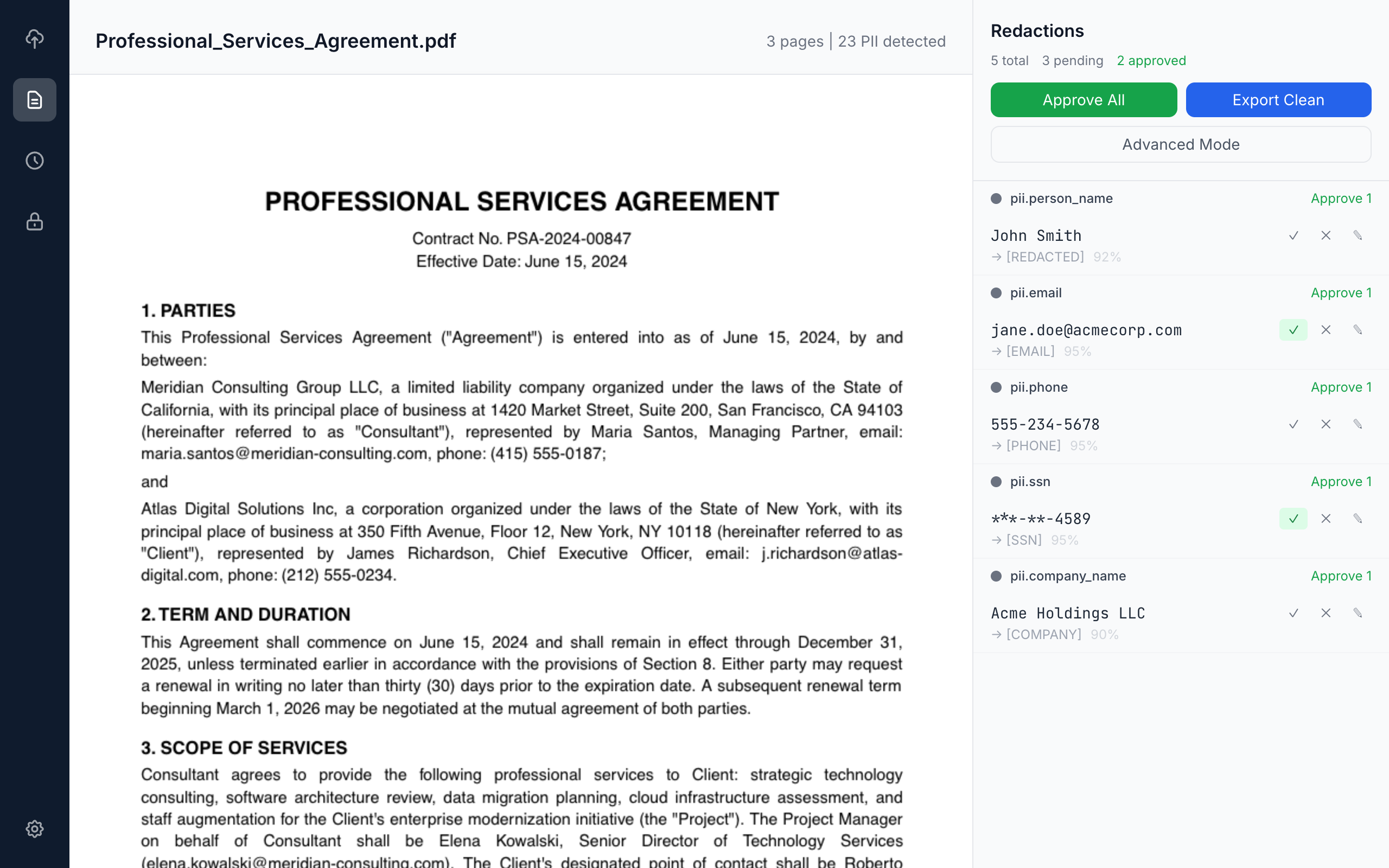
See all detected PII highlighted with color coding. Approve, reject, or edit each redaction.
Download the clean version with all approved redactions applied. Ready for filing.
We ran a 3-page Professional Services Agreement through Qvault. Here are the results — 25 PII entities found and redacted in under 2 seconds.
A 3-page Professional Services Agreement with names, SSNs, bank accounts, emails, credit cards, and more.
Download OriginalThe same contract after Qvault processing — all sensitive data replaced with category labels. Ready for filing.
Download RedactedEvery piece of sensitive data Qvault found in the sample contract:
| Category | Original Text | Redacted As | Page | Detection |
|---|---|---|---|---|
| Person Name | Maria Santos | [PERSON NAME] | 1, 2, 3 | Heuristic |
| Person Name | James Richardson | [PERSON NAME] | 1, 3 | Heuristic |
| Person Name | Elena Kowalski | [PERSON NAME] | 1, 3 | Heuristic |
| Person Name | Roberto Fernandes | [PERSON NAME] | 1, 3 | Heuristic |
| Organization | Meridian Consulting Group LLC | [ORGANIZATION] | 1, 2, 3 | Heuristic |
| Organization | Atlas Digital Solutions Inc | [ORGANIZATION] | 1, 3 | Heuristic |
| maria.santos@meridian-consulting.com | [EMAIL] | 1 | Regex | |
| j.richardson@atlas-digital.com | [EMAIL] | 1 | Regex | |
| elena.kowalski@meridian-consulting.com | [EMAIL] | 1 | Regex | |
| r.fernandes@atlas-digital.com | [EMAIL] | 1 | Regex | |
| Phone | (415) 555-0187 | [PHONE] | 1 | Regex |
| Phone | (212) 555-0234 | [PHONE] | 1 | Regex |
| Address | 1420 Market Street, Suite 200, San Francisco, CA 94103 | [ADDRESS] | 1 | Heuristic |
| Address | 350 Fifth Avenue, Floor 12, New York, NY 10118 | [ADDRESS] | 1 | Heuristic |
| SSN | 412-68-9103 | [SSN] | 2 | Regex |
| EIN | 82-4751093 | [EIN] | 2 | Regex |
| Credit Card | 4532-8901-2345-6789 | [CREDIT CARD] | 2 | Regex |
| Bank Account | 7823401956 | [BANK ACCOUNT] | 2 | Regex |
| Financial | $150,000.00 | [FINANCIAL] | 1 | Regex |
| Financial | $85,000.00 | [FINANCIAL] | 1 | Regex |
| Financial | $50,000.00 | [FINANCIAL] | 2 | Regex |
| Financial | $15,000.00 | [FINANCIAL] | 2 | Regex |
| Date | June 15, 2024 | [DATE] | 1, 3 | Regex |
| Date | December 31, 2025 | [DATE] | 1 | Regex |
| Date | March 15, 1985 | [DATE] | 2 | Regex |
Go beyond regex. We deploy private AI models on your infrastructure and integrate Qvault into your document pipeline — with zero data exposure.
We deploy and fine-tune private large language models (Llama, Mistral, and others) on your own servers or private cloud. AI-powered PII detection that never sends data outside your network.
Integrate Qvault into your existing document management workflow via MCP (Model Context Protocol). Automatic scanning and redaction as documents flow through your systems.
Purpose-built for law firms handling privileged communications, discovery, and regulatory filings. Custom pattern libraries for your jurisdiction and practice area.
On-premise or private cloud deployment. No data ever leaves your infrastructure. Meet GDPR, LGPD, HIPAA, and bar association compliance requirements with confidence.
Contact us at info@santacroce.es — we’ll design a deployment tailored to your organization.
Qvault is released under the MIT License. Use it freely with no restrictions.
THE SOFTWARE IS PROVIDED "AS IS", WITHOUT WARRANTY OF ANY KIND, EXPRESS OR IMPLIED. See the MIT License for details.
AI-enhanced redaction with full data sovereignty. Contact us to discuss your requirements.
Solutions for installation issues on macOS and Windows.
Qvault is not yet signed with an Apple Developer certificate. macOS Gatekeeper blocks unsigned apps by default. To fix this:
Alternatively, run in Terminal: xattr -cr /Applications/Qvault.app
Right-click (or Control-click) the app icon and select Open from the context menu. Click Open in the dialog. You only need to do this once — macOS will remember your choice.
Windows SmartScreen may block the installer because it is not signed with an EV code signing certificate. To proceed:
This is a one-time prompt. Windows will not block the app again after the first launch.
Some antivirus software may flag unsigned installers as suspicious. This is a false positive. You can add an exception for Qvault in your antivirus settings, or temporarily disable real-time protection during installation.